THE INFAMOUS SINGING MASKS Fun with talking telephones
by Mad Martian®
Halloween Songs
Show Tunes (much scarier!)
The Phone
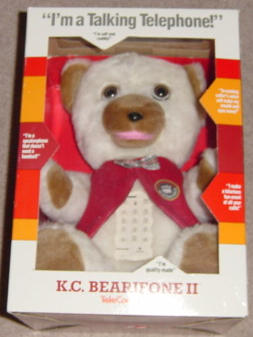
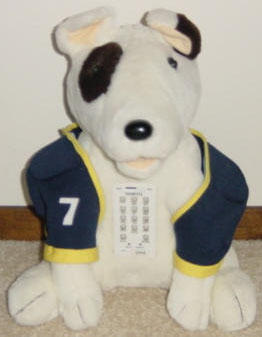
First you have to find these at garage sales, thrift stores, or auction sites. Here's what they look like:
KC Bearifone II
KC Bearifone II (cheaper model)
Rex Barkifone
My Phone Pal (Spud MacKenzie clone)
KC and Rex were made by TeleConcepts and Spud was made by Youngtel. The two models of the bear are identical inside. KC is much easier to find than Rex or Spud. Rex is a little larger than the others and you may be able to utilize the ear moving mechanism in your mask. Note that the Spud phone was more difficult to convert, so I would only use that one if you find one cheap. There were many copycat phones in the 80's, so you may find others (send me photos!).
Unscrew the bottom and remove the fur.
The Mask
Choose a mask with a lightweight and mobile lower jaw. If you can't move it VERY easily with your hand, it won't work on the phone. If the jaw is too heavy, the mouth won't close.
The Mouth Extension
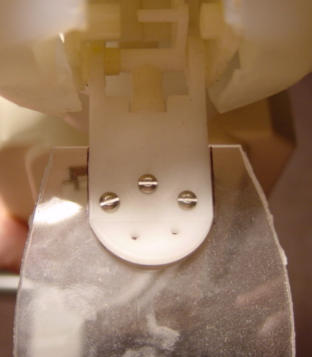
Cut a piece of plastic to fit inside the lower jaw of your mask. How big depends on the size of your mask. The smaller the better, since lighter weight provides better movement. You may want to put a piece of foam in the lower jaw and cut a slit in it for the plastic piece to fit snuggly. You can attach the plastic anyway you like. I chose 3 small nuts and bolts.
The Stiffener
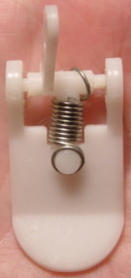
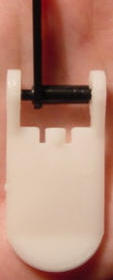
This is optional, but necessary for most masks. Your phone comes with a spring between the jaw piece and the mechanism. This allows children to abuse their phone without breaking the mouth piece. It also allows too much slack when something heavier is on the jaw piece. I replace it with a piece of rigid plastic tubing or a steel PC board spacer. Both are available from most electronic supply places. The key is to get a size that fits snugly and exactly, so bring the part with you. Be careful not to break off the nub from either part.
jaw piece with spring still attached.
Jaw piece with broken upper nub! Be careful.
Jaw piece with rigid plastic spacer installed.
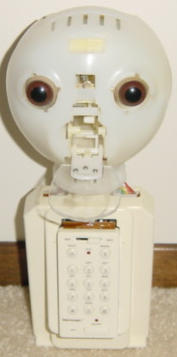
Here's what you'll have, ready to attach your mask:
Completed unit.
Plastic attachment.
Now you can attach your mask! Stuff it until it sits right for the best mouth movement. You can now talk to your mask while on the phone. Interesting, but we're missing a key piece.
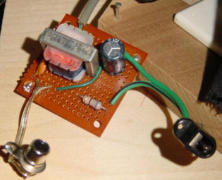
The Transmogrifier
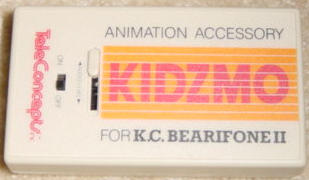
This device converts standard audio signals for use with the phone. If you can't find the commercial unit, called the "Kidzmo", you'll have to do some soldering.
Making a mask talk or sing without any music is easy. The phone reacts to sound, so as you talk or sing, the mouth moves. An ipod or an old cassette player with an endlees loop tape work equally well. Since music will trigger the phone as well, other steps must be taken to have the masks sing with music.
Music with One Mask
Basically you need to create the signal to open the mouth separately from the soundtrack since the voice cannot be separated from the music. This can be accomplished for one mask by recording separate left and right channels, with the original music on one channel connected to a speaker and a signal to make the mouth open on the other channel connected to the phone. You can also use an audio y-adapter to run two masks that sing in unison.
Music with Multiple Masks
Once you have one unit working, you'll want more! You can accomplish any number of singing masks with a multi-track recorder, as long as it has separate audio outputs for each track. Use track 1 for the original music, track 2 for the lead singer, track 3 for backup, and track 4 with an audio y-adapter for the chorus for a total of 4 masks. The more tracks you have, the more masks can sing different lyrics, but remember you have to program each track, so I would stick with a 4-track recorder.
Making the Signal
Making the signal is easy - use any sound that makes the mouth open. I used an electronic keyboard and played different notes until I found one that worked best, then I created the signal track by hitting that key along with the singing in the music track. You won't get absolutely perfect sync, but it works and it's how I made the above demos. If you want perfect sync and ease of editing, you'll want to do all this on the computer in a multi-track sound editing program. Then you can copy/paste/drap/drop the signal using the mouse and knock it out pretty quickly. You'll then want to transfer the tracks to a digital multi-track player or use an Audio Interface for the computer that mimics a multi-track recorder through software.
Selecting a Multi-track Recorder or Computer Audio Interface
If you go with a multi-track recorder, you'll want to make sure it's digital. The digital ones interface with a computer for easy editing. If you intend to always run the masks from the computer, you may as well save a few bucks and just get an Audio Interface. Most multi-track recorders and computer audio interfaces output only 2 channels, regardless of how many inputs they have. You want one with at least 4 direct outputs. This is a marketable feature and should be stated on the box or in the specs on the web.


 Shopping · Fast Food · Gross Food · Music · Masks · Hearse · Projects